
 [RFE] 'Esc' keypress could defocus search filed to enable rest of shortcuts
NOTE: I observed that 'Tab' do the direct opposite, thus enters search field, please correct me, if I'm wrong.

 Šipečka? :O
Rozklikavaci sipecka vedle otazniku vypisuje nejake docasne info pro vyvojare ci co :). Jo a mate hezke slecny ve Vankovce.

děkujeme za váš dotaz. Pod rozklikávací šipkou zaujímá největší plochu historie procházení. Zobrazují se zde hledání, složky, seznamy nahraných videí apod. Tato historie vám může pomoci snadno se navrátit k předešlým krokům při vašem procházení či hledání obsahu.

Add posibility to put addresses of videos into the search field
When I have a video opened in another tab or find a link somewhere, I would like to be able to copy that link into the search field of OrganizeTube to find the video.
1. Copy a link (e.g. http://www.youtube.com/watch?v=KaVnA88oNTg or KaVnA88oNTg) into the search field
2. Toggle search by pressing enter or clicking on the search icon
Current behavior: There are no results of the search.
Requested behavior: The exact one video is found (the one the link directs to)
Hello Martin,
thank you for your message. Feature you have described is already implemented in OrganizeTube.
You can use either input field on home screen (http://www.organizetube.com/#home) or search field on the left side which redirects you to the home screen with the result.
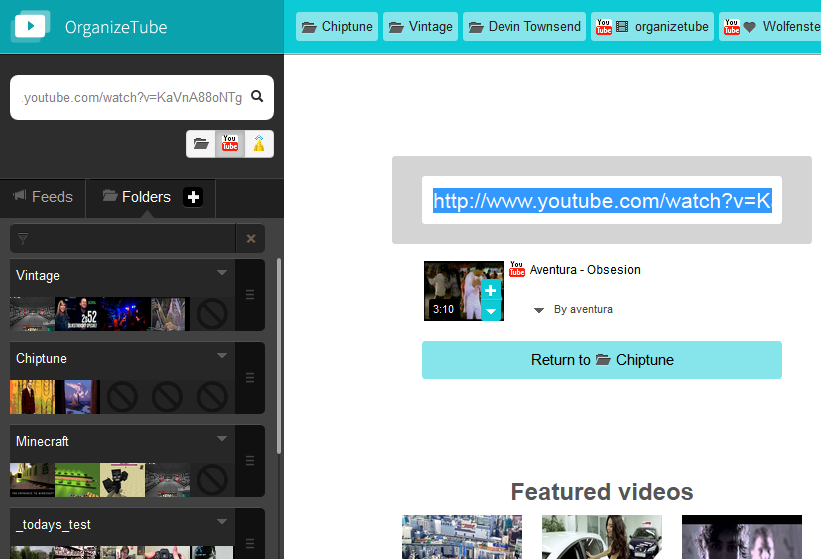
You can do the same with links to playlists or YouTube user profiles. And in the majority of current HTML5-enabled browsers it is also possible to drag the link from another window and drop it into OrganizeTube.
Here is list of link formats that OrganizeTube should recognize:
Videos:
- *.youtube.com/watch?v=xxxxxx
- *.youtu.be/xxxxxx
- *.dailymotion.com/video/xxxxxx
Playlists:
- *.youtube.com/?list=xxxxxx
- *.dailymotion.com/playlist/xxxxxx
Users:
- *.youtube.com/user/xxxxxxx
Video IDs alone are not supported because it is difficult to recognize which object type they represent.
We are planning to support as much link formats as possible in the near future (e.g. support for URL shortening services, redirect URLs used on the most common social networks etc.)

 Celá složka do playlistu
Dobrý den, nemůžu přijít na to, jak přidat všechny videa (písničky) z jedné složky do playlistu. Děkuji
Za komplikace při hledání řešení se omlouváme s příslibem rozšíření a přepracování nápovědy, které máme již v plánu.

Jak mohu zavřít již vyhledané výrazy?
Jak mohu zavřít již vyhledané výrazy v horním panelu? Nevidím žádná tlačítka. Děkuji :).
Dobrý den, děkujeme za Váš dotaz.
Horní lišta funguje obecně jako historie otevřených seznamů. Odstraňování jednotlivých položek není v tuto chvíli možné, protože jsme funkci lišty zamýšleli jako kompletní historii sloužící pro snažší orientaci.
Váš dotaz bereme ovšem současně jako podnět a zauvažujeme nad možností jednotlivé položky z historie odstranit.
Bez va!
Thank you for your praise! We appreciate it very much a we'll work hard to make it even better for all of you.

Jak zvětšit přehrávaná videa?
Videa se přehrávají v pravém sloupci, rád bych je sledoval na větším prostoru, pro vyhledávání nepotřebuji tolik prostoru, levý sloupec bych si přál skrýt. Je z toho něco možné? Nápověda příliš pomoci nenabízí.
V současnosti je k dispozici pouze možnost přejít do režimu celé obrazovky (tlačítko
 pod přehrávačem). V tomto režimu máte nadále k dispozici svůj playlist. V dohledné době plánujeme aplikaci doplnit o možnost přepnout přehrávač v pravém sloupci do druhého stupně velikosti.
we are sorry you are experiencing troubles.
In OrganizeTube you can create embedded player code for your public forder. In order to achieve this you have to do following steps:
1) Select public sharing in folder's dropdown menu:
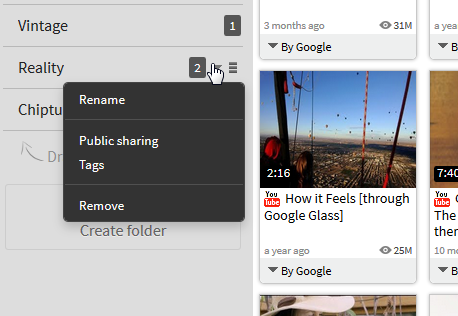
2) Make you folder public and then on Embed tab you can copy embed code using a Copy button.
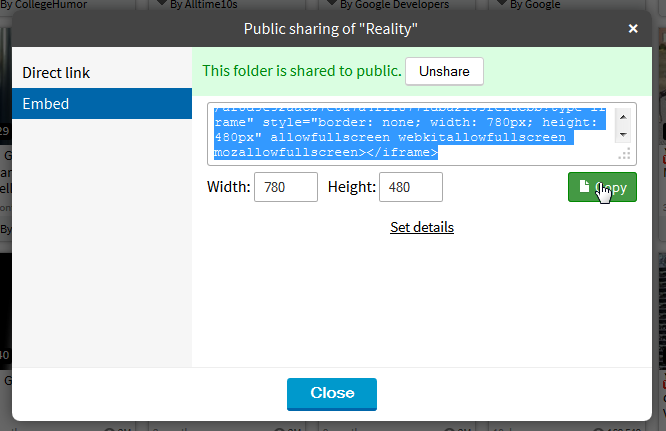
If this process does not work for you, please provide us more information (steps to reproduce, web browser and operating system you are using).

Ability to view videos from subscriptions on home screen.
Maybe could enable/disable this feature in options.
Maybe even auto-updating feed.
Hello, thanks for your suggestion.
We are planning to make users' most used feeds more accessible via extended "pin" functionality. This will include some form of video displaying on the home screen. We are currently in pre-design phase, but you can look forward for this feature, it will be available soon.
[BUG] adding channel's playlist as folder store tracks in opposite order
Expected:
tracks are added in the very same order as the original playlist.
Customer support service by UserEcho
